

In this article
The next frontier in AI development is not a single, smarter model but a coordinated network of specialized agents working together toward a shared goal. Multi-agent systems (MAS) represent a paradigm shift in how we design intelligent software: instead of one monolithic LLM answering everything, you decompose complex tasks across collaborating agents, each with a defined role, memory, and toolset. Frameworks like Microsoft’s AutoGen make this architectural vision accessible in pure Python, letting developers spin up Planner agents, Executor agents, and Critic agents that converse with each other autonomously. As enterprises increasingly demand AI systems that can reason, verify, and act across multi-step workflows, understanding how to orchestrate these agents is no longer optional. It is a foundational engineering skill.
What Is a Multi-Agent System?
A multi-agent system is a computational architecture in which multiple autonomous agents interact, negotiate, and collaborate to solve problems that would be too complex or inefficient for a single agent. Each agent perceives its environment, maintains internal state, and takes goal-directed actions.
In the context of modern LLM-powered applications, this translates to multiple language model instances (or hybrid model-plus-tool setups) that communicate via structured messages. Think of it as a virtual team: one agent writes code, another reviews it, a third searches the web for context, and a manager agent coordinates the workflow.
Why AutoGen?
AutoGen, developed by Microsoft Research, is one of the most mature and production-ready frameworks for building multi-agent conversational systems in Python. It abstracts the complexity of agent-to-agent communication, tool execution, and conversation history management while remaining highly customizable.
Key features include:
- ConversableAgent: The base class for all agents, supporting LLM backends, human proxy, and tool calling.
- AssistantAgent: A pre-configured LLM-backed agent designed to follow instructions and write code.
- UserProxyAgent: Acts as a human-in-the-loop or autonomous executor that can run code locally.
- GroupChat and GroupChatManager: Coordinates multi-agent roundtable discussions with configurable speaker-selection logic.
AutoGen supports OpenAI models, Azure OpenAI, Mistral, Anthropic Claude, and local models via LiteLLM, making it backend-agnostic and enterprise-flexible.
Architecture Overview
Press enter or click to view image in full size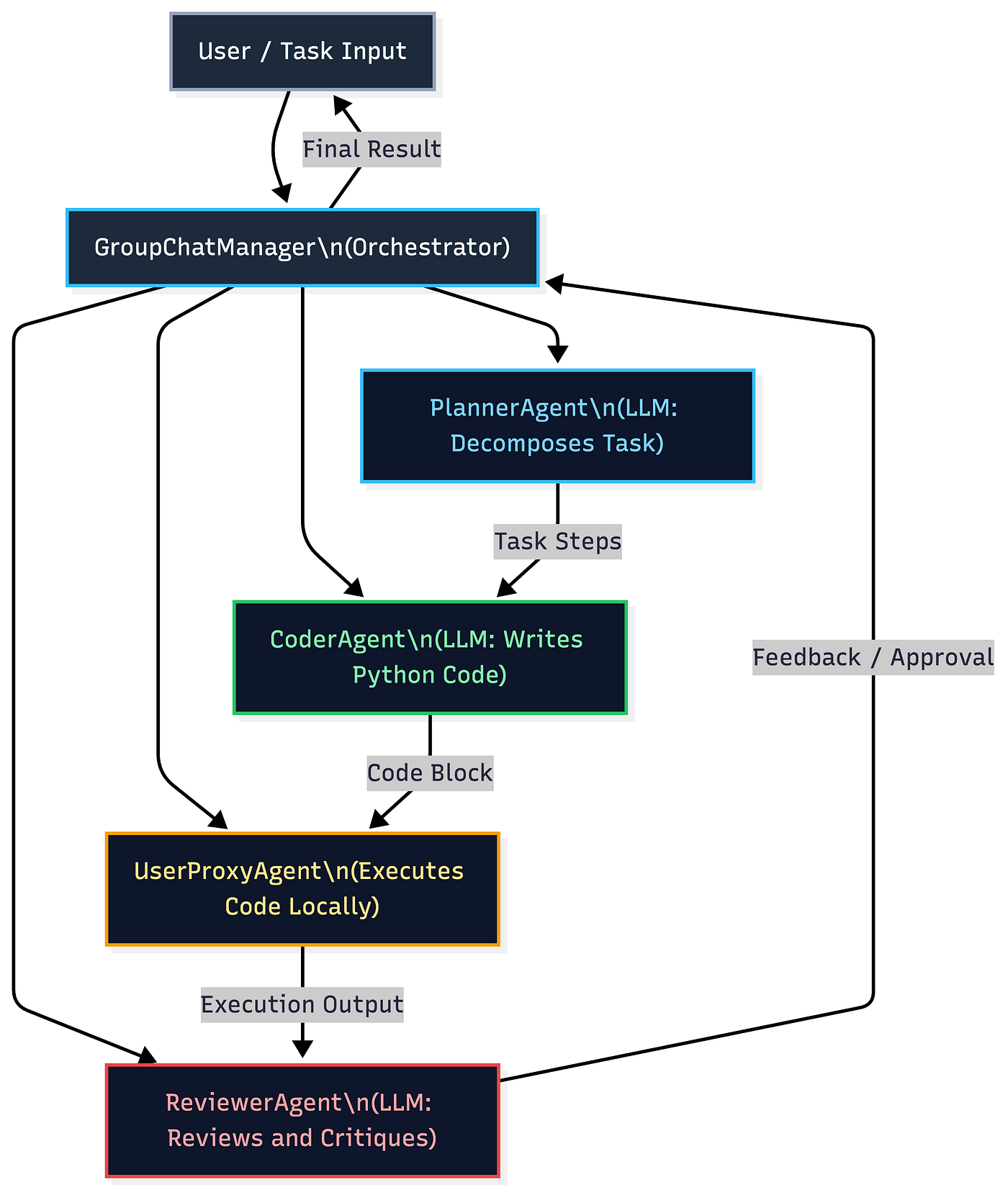
This pattern is known as a Planner-Executor-Critic loop and is the backbone of most production multi-agent deployments.
Related Tools and Frameworks
While AutoGen is the focus here, the multi-agent ecosystem is rich:
- LangChain / LangGraph: Offers graph-based agent orchestration with state machines, excellent for cyclic workflows.
- CrewAI: A higher-level abstraction over AutoGen and LangChain, great for role-based agent crews.
- Semantic Kernel: Microsoft’s SDK for integrating LLMs with memory, skills, and plugins in C# and Python.
- OpenAI Swarm: A lightweight experimental framework for exploring agent handoffs.
AutoGen stands out for its native support of code execution, robust conversation history management, and GroupChat dynamics, which makes it uniquely suited for engineering-heavy workflows.
Detailed Code Sample with Visualization
The following example demonstrates a two-agent AutoGen setup where an AssistantAgent writes a Python data analysis script and a UserProxyAgent executes it and reports results. This pattern is directly applicable to automated reporting pipelines, data engineering tasks, and research assistants
Installation
pip install pyautogen matplotlib pandas
Full Example
import autogen
import os

# -------------------------------------------------------
# Step 1: Configure the LLM backend
# AutoGen supports OpenAI, Azure, Anthropic, and local models.
# We use environment variables to keep secrets out of code.
# -------------------------------------------------------
config_list = [
    {
        "model": "gpt-4o",
        "api_key": os.environ.get("OPENAI_API_KEY"),
    }
]

llm_config = {
    "config_list": config_list,
    "temperature": 0.2,       # Lower temperature = more deterministic, precise code
    "cache_seed": 42,         # Reproducible results for debugging
}

# -------------------------------------------------------
# Step 2: Define the AssistantAgent (the Coder)
# This agent receives task instructions and writes code.
# It does NOT execute code itself; execution is delegated.
# -------------------------------------------------------
assistant = autogen.AssistantAgent(
    name="DataAnalystAgent",
    llm_config=llm_config,
    system_message="""
    You are an expert Python data analyst.
    When given a data task, write clean, well-commented Python code.
    Always save any generated charts as PNG files.
    Respond with ONLY the code block. Do not explain unless asked.
    When the task is complete, reply with TERMINATE.
    """,
)

# -------------------------------------------------------
# Step 3: Define the UserProxyAgent (the Executor)
# This agent proxies the human role. In NEVER mode,
# it runs fully autonomously without human input.
# Code execution is sandboxed via a local Docker container
# or the current Python environment.
# -------------------------------------------------------
user_proxy = autogen.UserProxyAgent(
    name="ExecutorAgent",
    human_input_mode="NEVER",           # Fully autonomous execution
    max_consecutive_auto_reply=10,       # Safety ceiling on auto-replies
    is_termination_msg=lambda msg: "TERMINATE" in msg.get("content", ""),
    code_execution_config={
        "work_dir": "agent_workspace",   # Code runs in this directory
        "use_docker": False,             # Set True in production for isolation
    },
    llm_config=False,                   # Executor does not use an LLM
)

# -------------------------------------------------------
# Step 4: Initiate the conversation with a concrete task
# The UserProxy sends the task to the AssistantAgent.
# AutoGen manages the back-and-forth automatically.
# -------------------------------------------------------
task = """
Generate a synthetic sales dataset with 100 rows containing:
- 'month' (Jan to Dec, repeated)
- 'product' (randomly from ['Widget A', 'Widget B', 'Widget C'])
- 'revenue' (random float between 1000 and 50000)
- 'units_sold' (random int between 10 and 500)

Then:
1. Compute total revenue and average units sold per product.
2. Plot a bar chart of total revenue by product.
3. Save the chart as 'revenue_by_product.png'.
4. Print the summary statistics to the console.
"""

user_proxy.initiate_chat(
    recipient=assistant,
    message=task,
    clear_history=True,
)

print("Agent task completed. Check agent_workspace/ for output files.")
What Happens Under the Hood
When initiate_chat is called, the following sequence unfolds:
- The
ExecutorAgentsends the task string toDataAnalystAgent. DataAnalystAgentcalls the LLM with the task and its system prompt, returning a Python code block.ExecutorAgentdetects the code block, extracts it, and runs it in theagent_workspacedirectory.- The stdout output and any errors are captured and sent back to
DataAnalystAgentas the next message. - If the code errored,
DataAnalystAgentauto-corrects and resubmits. This loop continues until success ormax_consecutive_auto_replyis reached. - Once successful,
DataAnalystAgentreplies withTERMINATE, ending the conversation.
Extending to GroupChat (Three-Agent Pipeline)
# Add a ReviewerAgent that critiques the code before execution
reviewer = autogen.AssistantAgent(
    name="ReviewerAgent",
    llm_config=llm_config,
    system_message="""
    You are a senior Python code reviewer.
    Review code for correctness, efficiency, and security.
    If the code is acceptable, reply: 'APPROVED: proceed.'
    If not, explain what to fix clearly and concisely.
    """,
)

# GroupChat lets all three agents communicate in a round-table fashion
group_chat = autogen.GroupChat(
    agents=[user_proxy, assistant, reviewer],
    messages=[],
    max_round=15,
    speaker_selection_method="auto",   # AutoGen selects next speaker by context
)

manager = autogen.GroupChatManager(
    groupchat=group_chat,
    llm_config=llm_config,
)

# Kick off the group workflow
user_proxy.initiate_chat(
    recipient=manager,
    message=task,
    clear_history=True,
)
With this three-agent setup, the pipeline becomes: Coder writes code, Reviewer critiques it, Executor runs the approved version. This mirrors a real engineering code review workflow, fully automated.
Pros of Multi-Agent Systems with AutoGen
- Task decomposition and specialization: Complex workflows are split among agents with focused roles, dramatically improving output quality over single-agent prompting.
- Self-correction loops: Agents critique and revise each other’s outputs iteratively, reducing errors without human intervention.
- Scalability: Add new agents to the group without restructuring existing ones. The manager handles routing dynamically.
- Backend flexibility: AutoGen works with OpenAI, Azure OpenAI, Anthropic, Mistral, and local models (via LiteLLM), preventing vendor lock-in.
- Code execution integration: Native support for running, testing, and debugging code within the agent loop is a major differentiator for engineering tasks.
- Human-in-the-loop support: Switch any agent to interactive mode to insert expert judgment at any decision point without redesigning the architecture.
- Active open-source community: AutoGen has a large, fast-moving GitHub community with regular updates, a rich extension ecosystem, and enterprise adoption from Microsoft, as well as companies in finance and healthcare.
- Auditability: The full conversation history between agents is logged and inspectable, making it easier to trace decisions compared to black-box single-model outputs.
Industries Using Multi-Agent Systems
Healthcare
Hospital systems are deploying multi-agent pipelines where one agent retrieves patient records from EHR systems, a second agent cross-references clinical guidelines, and a third drafts care plan recommendations for physician review. This reduces administrative burden significantly and improves documentation accuracy.
Finance
Investment banks and fintech firms use multi-agent systems for autonomous research workflows: a data-gathering agent pulls earnings reports and SEC filings, an analysis agent synthesizes trends, and a risk agent flags anomalies before a final report is generated for human analysts. Compliance checks can be embedded as a dedicated reviewer agent.
Retail and E-Commerce
Retailers use agent networks to automate demand forecasting pipelines where agents handle data ingestion, statistical modeling, anomaly detection, and report generation independently. AutoGen-style agents are also used in customer support automation, where a routing agent classifies queries and delegates to specialist agents.
Automotive
OEMs and Tier-1 suppliers are experimenting with multi-agent systems for autonomous vehicle simulation testing: one agent generates test scenarios, a second runs simulations, a third validates results against safety standards, and a fourth flags edge cases for human engineers.
Legal
Law firms use multi-agent systems for contract analysis and due diligence. One agent parses contract clauses, a second flags deviations from standard templates, and a third drafts redline suggestions. This compresses a multi-hour task to minutes while keeping a lawyer in the final approval loop.
How PySquad Can Assist in This
Building multi-agent systems in production is not just about wiring up API calls. It demands deep engineering judgment, architectural discipline, and hard-won experience with edge cases, security boundaries, and performance bottlenecks. PySquad brings exactly that.
- PySquad has hands-on expertise with AutoGen, LangGraph, and CrewAI, meaning PySquad can evaluate which framework genuinely fits your use case rather than defaulting to the most popular option.
- PySquad designs agent architectures from the ground up, including role definitions, tool schemas, memory strategies, and termination logic that prevent runaway loops in production.
- PySquad builds with security as a first principle: all code execution agents deployed by PySquad are sandboxed using Docker with resource limits, preventing prompt injection attacks from compromising host systems.
- PySquad integrates multi-agent pipelines with your existing data infrastructure, whether that means connecting agents to internal APIs, vector databases, SQL warehouses, or third-party SaaS tools.
- PySquad provides full observability layers on top of AutoGen workflows, including tracing, logging, and alert systems, so your team always knows exactly what agents are doing and why.
- PySquad’s Python engineers hold deep expertise in LLM fine-tuning and prompt engineering, ensuring that the system messages and instruction sets governing each agent are precision-crafted, not generic.
- PySquad delivers production-grade code with comprehensive test suites, including mock-agent tests that validate conversation flows without incurring expensive LLM API costs during CI/CD.
- PySquad supports multi-cloud deployment: whether you run on Azure OpenAI, AWS Bedrock, or a self-hosted Mistral cluster, PySquad architected systems remain portable and cost-optimized.
- PySquad offers post-deployment support and iteration cycles, recognizing that multi-agent systems evolve as business requirements change and model behavior shifts with version updates.
- When you partner with PySquad, you are not getting a vendor, you are getting a technical co-builder that treats your agent system as a living product, not a one-time deliverable.
References
- Microsoft AutoGen Official Documentation and GitHub Repository https://github.com/microsoft/autogen
- AutoGen: Enabling Next-Gen LLM Applications via Multi-Agent Conversation (Research Paper, Microsoft Research) https://arxiv.org/abs/2308.08155
- LangGraph: Multi-Agent Workflows Documentation (LangChain) https://langchain-ai.github.io/langgraph/
- OpenAI Cookbook: Multi-Agent Orchestration Patterns https://cookbook.openai.com/
- CrewAI Framework Documentation https://docs.crewai.com/
Conclusion
Multi-agent systems represent a genuine architectural evolution in how AI solves hard problems. By distributing cognition across specialized, collaborating agents rather than asking a single model to do everything, you gain modularity, self-correction, scalability, and interpretability in one architectural move.
AutoGen makes this accessible in Python today. The patterns shown in this post, from two-agent code execution loops to three-agent GroupChat review pipelines, are not research prototypes. They are production-deployable architectures that teams are running at scale right now across finance, healthcare, retail, and beyond.
The code samples here give you a functional starting point, but the real depth lies in how you design agent roles, handle failure modes, secure execution environments, and integrate agents with your organization’s data layer. That is where engineering judgment matters most.