Compatible custom modules and tested integrations.
Validated business data and critical workflows.
Controlled deployment with reduced operational risk.
Results depend on scope, integrations and adoption.
The operating context
A clearer view of the whole operation.
Migrating to Odoo 20 from older versions requires more than a database upgrade. Changes to custom modules, access rights, integrations, and business workflows can affect daily operations. PySquad helps businesses migrate from Odoo 15, 16, 17, 18, or 19 to Odoo 20 through compatibility assessments, code updates, data validation, and planned deployment. The migration approach depends on your current version, edition, and technical requirements.
Where friction builds
An Upgraded Odoo Database Can Still Break Daily Operations
Your current Odoo system may rely on custom modules, third party apps and reports built for older data models. Odoo 20 changes to access permissions and chatter tracking can affect approvals, audit reports, integrations and what users can see.
Without a module inventory, isolated testing and data reconciliation, an upgraded ERP may still fail during invoicing, stock movements or automated jobs. The main risk is putting a new system into production before users and finance teams have verified it works.
Current approach
Upgrade the database without a full audit.
Reuse existing custom modules.
Test only basic Odoo functions.
Deploy without a cutover rehearsal.
Operational impact
Custom modules become incompatible.
Integrations and automated workflows fail.
Accounting and inventory errors go unnoticed.
Unplanned downtime disrupts operations.
Inside the solution
The capabilities behind the operation.
Review the functional scope, then discuss the requirements specific to your team.
Odoo 20 Upgrade Feasibility Assessment
Assess Odoo 16, 17, 18, or 19 environments for migration to version 20. Review Enterprise or Community requirements, hosting, database compatibility, custom modules, and available upgrade routes to define technical scope and risks.
Custom Module and Security Migration
Adapt custom Python models, ORM logic, XML views, QWeb reports, and frontend components for Odoo 20. Review changes to access rights, record rule dependencies, stored chatter tracking values, and third party modules before testing.
Odoo Database and Attachment Migration
Plan the eligible database conversion and validate PostgreSQL records, relationships, configurations, and filestore attachments. Compare record counts, trial balances, receivables, payables, and stock valuations against agreed source data.
Third Party Module and API Compatibility
Assess vendor module availability and test payment gateways, shipping providers, eCommerce connections, external APIs, and automated jobs. Identify integrations requiring code changes, replacement, or reconfiguration.
Odoo 20 Business Workflow Testing
Test accounting, sales, purchasing, inventory, manufacturing, payroll, reporting, and user permissions where applicable. Use real business scenarios and documented acceptance criteria to identify issues before production deployment.
Staging, Cutover and Upgrade Support
Prepare an isolated test environment, rehearse the migration, verify backups, and plan the production cutover. Define expected downtime, recovery procedures, deployment checks, and postmigration issue resolution.
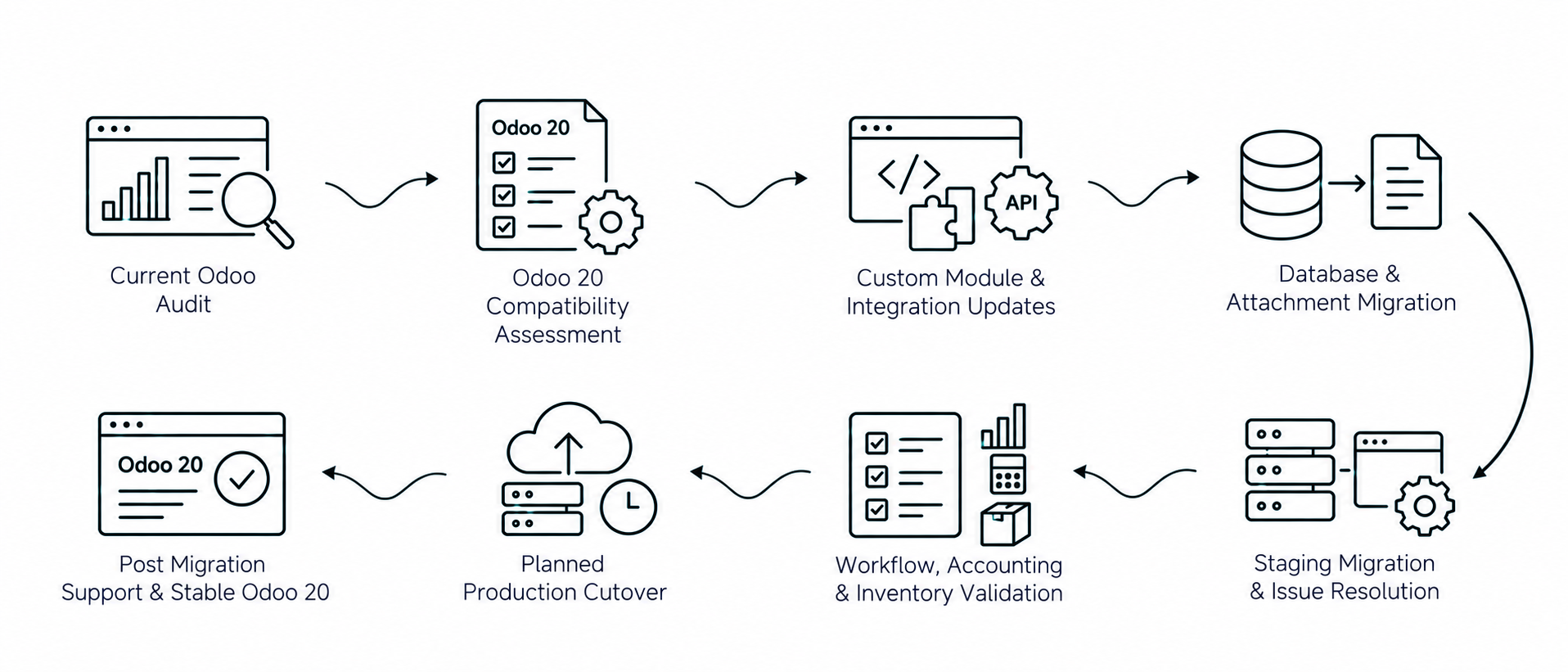
Audit existing Odoo modules, databases, and integrations.
02
Assess Odoo 20 compatibility and migration requirements.
03
Update custom modules, reports, and integrations.
04
Run staging migration and resolve compatibility issues.
05
Validate business workflows, accounting, and inventory data.
06
Execute planned cutover and provide migration support.
Our approach
PySquad plans Odoo 20 upgrades around the system your business already operates. We assess your current Odoo version, Enterprise or Community edition, hosting environment, PostgreSQL database, custom modules, and external integrations to identify the migration work required. An Odoo 18 to Odoo 20 migration may need a different level of code adaptation and validation from an Odoo 19 to Odoo 20 upgrade.
How it connects
The complete workflow, in one view.
Make an informed decision
Is this the right fit?
The right solution starts with the right operating requirements.
Can we migrate directly from Odoo 16, 17, 18, or 19 to Odoo 20?
An upgrade to Odoo 20 depends on your source version, hosting environment, edition, and the availability of supported migration tools. Odoo Enterprise's official upgrade service can handle eligible database conversions across multiple versions, while Community migrations may require sequential migration work and additional scripts. Custom modules and third party applications must also support the target release.
What changes in Odoo 20 can affect our custom modules and integrations?
Odoo 20 introduces changes that may affect custom Python code, permissions, reports, and external integrations. Record rules have been replaced by domain based access rights, while stored chatter tracking values have been removed from the standard framework. Custom modules that depend on these structures may require adaptation. Accounting, inventory, manufacturing, and other workflows also need to be tested for changed behavior.
How are Odoo Enterprise and Community upgrades to version 20 different?
Odoo Enterprise subscriptions include official database upgrade services for eligible installations, covering standard applications and certain maintained customizations. Independently developed or third party modules outside the maintenance scope may require separate engineering work. Community Edition migrations rely on different tools and development processes, with availability depending on the version and installed modules.
How much does an Odoo 20 upgrade cost, and how long does migration take?
The cost and timeline depend on your current version, database size, custom module complexity, third party app compatibility, hosting infrastructure, and testing requirements. An Odoo 19 to Odoo 20 upgrade with limited customizations may require less work than migrating a heavily customized Odoo 16 environment. Database conversion is only one part of the project. Code updates, data validation, user acceptance testing, and production planning can represent substantial additional effort.
How do you validate data and reduce downtime during an Odoo 20 migration?
The migration should first be tested on an isolated copy of the database. Validation includes checking record relationships, filestore attachments, accounting balances, stock valuations, custom modules, integrations, and agreed business workflows. Before deployment, the production cutover should be rehearsed, backups verified, and a suitable downtime window agreed upon. Odoo production upgrades involve a period of database unavailability, so zero downtime should not be assumed. The final deployment proceeds after technical checks and business approval.
Start with your requirements
Let’s define your next step.
Tell us what needs to work better, the systems you use, and the scope you have in mind.