
WhatsApp Chat Window Odoo app icon

Odoo WhatsApp Chat Window for Contacts

Open customer WhatsApp conversations from Odoo contacts and review messages sent from Odoo alongside customer replies in one focused chat window.

  • Community
  • Enterprise
  • Odoo.sh
  • On-premise

Industry

Logistics, Manufacturing, Retail, Services, Wholesale

Buy
WhatsApp Chat Window Odoo module preview

Overview

About this app

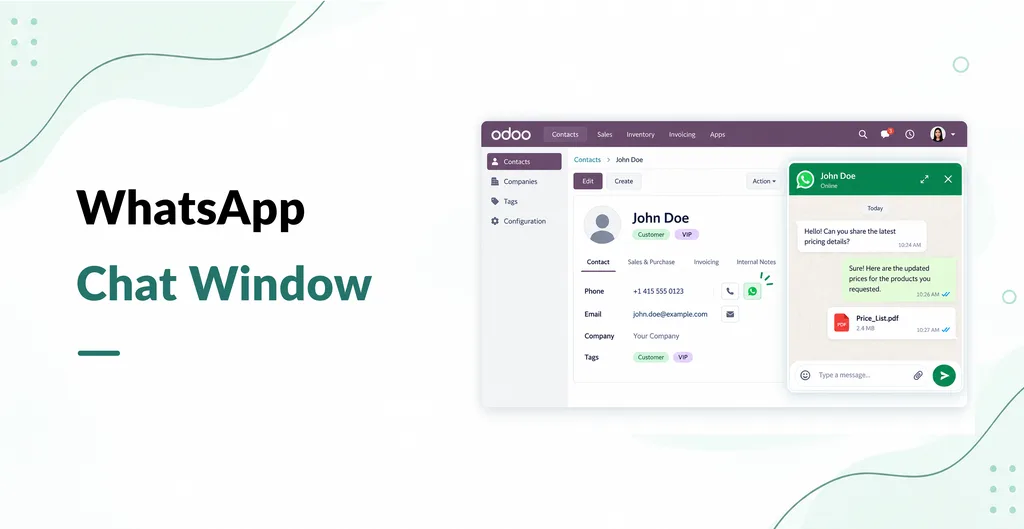
WhatsApp Chat Window adds contact level access to existing WhatsApp conversations in Odoo. Open a contact, click the WhatsApp phone icon, and review messages sent from Odoo alongside customer replies in one window. It uses PySquad's WhatsApp Integration and the Odoo bus module; the matching integration package is included for the same Odoo version. Versions are available for Odoo 19 and 20 Community and Enterprise.

Features

  • Open WhatsApp Chats from Contacts

    Launch the associated WhatsApp conversation from the phone icon on an Odoo contact record, connecting conversation access to the relevant customer profile.

  • Unified Sent and Received Messages

    Review messages sent from Odoo alongside incoming customer replies in one conversation window, keeping both sides of the exchange accessible together.

  • Existing WhatsApp Integration

    Uses the required pys_whatsapp integration as its messaging connection. The integration must be installed and configured before the chat window can be used.

  • Odoo 19.0 and 20.0 Releases

    Choose the available module release matching Odoo 19.0 or 20.0. Compatibility with other major Odoo versions is not established by the supplied source.

  • Community and Enterprise Compatibility

    The app listing identifies both Odoo Community and Enterprise as supported editions, subject to the documented module dependencies.

  • Odoo.sh and On-Premise Deployment

    The listing identifies compatibility with Odoo.sh and on-premise deployments, giving buyers defined hosting options for their Odoo environment.

WhatsApp Chat Window adds contact based access to customer conversations in Odoo. Open a contact and select the WhatsApp phone icon to review messages sent from Odoo alongside replies received from the customer.

Open Conversations from Contact Records

Launch the associated WhatsApp conversation directly from an Odoo contact. This keeps conversation access close to the customer information your sales or service team is already reviewing.

Review Sent Messages and Customer Replies

View messages sent from Odoo alongside incoming customer replies in one chat window. The add on helps users review the conversation in the contact workflow instead of searching through separate records.

Use the Existing WhatsApp Integration

The chat window relies on PySquad's WhatsApp Integration and the Odoo bus module. The matching WhatsApp Integration package for the selected Odoo version is included with the purchase, but it must be installed and configured before the chat window can be used.

Keep the Product Scope Clear

This add on provides access to conversations associated with Odoo contacts. It is not a website visitor chat widget and does not document bulk campaigns, message template management, or automated customer journeys.

Compatibility and Purchase Requirements

The app is listed for Odoo 19 and 20 Community and Enterprise, with Odoo.sh and on premise deployment options. It costs USD 79 for the selected Odoo version, includes three months of free support, and uses Odoo Proprietary License v1.0 for one production database. Check that the selected version matches your Odoo installation before purchasing.


A closer look

Reviews

Be the first to rate this app.

Leave a rating

Rating

Your email is not shown publicly.

Need a full demo or a customized workflow?

Book a walkthrough of this app on a live instance, or tell us how you want the module to fit the process you already run.

A little closer, wherever you are

Big world.
Close partnership.

Product engineering, AI and Odoo ERP, with a shared plan and a working rhythm built around your team.

IndiaSpainFrance
Our offices Customer presence

Different time zones. One shared vision.

Explore our global presence