Chatter Toggle Odoo app icon

Odoo Chatter Toggle to Hide Form Chatter

Hide or show the Chatter on Odoo form views with one button, so the form can use the full width.

  • Community
  • Enterprise
  • Odoo.sh
  • On-premise

Industry

Services

Downloads

11

Chatter Toggle Odoo module preview

Overview

About this app

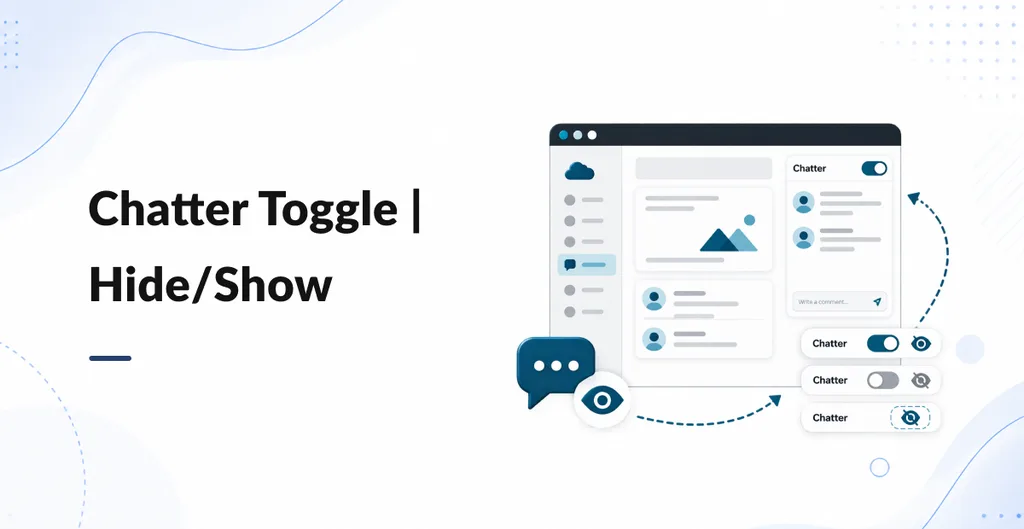
Chatter Toggle adds a small button on the right of backend form views that have Chatter (Send message, Log note, Activities). Click Hide to collapse that panel and let the form grow. Click Show (comments icon) to bring Chatter back. Messages are not deleted. There is nothing to configure. The choice is not remembered after you leave the form or refresh. It does not add access rights per user.

Features

  • Hide Chatter on the form

    Collapse the message panel so order lines and fields can use more of the screen.

  • Show it again

    A comments button brings Send message, Log note, and Activities back.

  • No configuration

    Install and use. No settings, no extra access groups.

  • Does not delete history

    Hiding only changes what you see. Chatter data stays on the record.

Chatter Toggle is a small backend UI helper. On form views that already have Chatter, it adds a round button on the right of the screen. Hide Chatter when you want more space for fields and lines. Show it again when you need messages, notes, or activities.

Install and open any form that has Chatter (for example a sales order). Chatter is visible at first. Use the eye-slash button to hide it. Use the comments button to show it. Forms with no Chatter get no button.

  • One click: Hide or show the Chatter panel. The form sheet can use full width while Chatter is hidden.
  • No setup: No Settings screen and no extra groups. Every backend user who can open the form sees the same buttons.
  • Display only: Chatter records stay on the document. This does not remove followers, messages, or activities from the database.
  • This visit only: If you leave the form or refresh, Chatter is shown again. The choice is not stored per user.

Works on Community and Enterprise, including Odoo.sh and on-premise. English button labels only. It does not change the Discuss app, list views, or the website.


Reviews

Be the first to rate this app.

Leave a rating

Rating

Your email is not shown publicly.

Need a full demo or a customized workflow?

Book a walkthrough of this app on a live instance, or tell us how you want the module to fit the process you already run.

A little closer, wherever you are

Big world.
Close partnership.

Good work travels. We bring product engineering, AI and Odoo ERP to the conversation, and make room for your way of working.

01 / BaseAhmedabadIndia, remote
02 / ApproachOne shared planDiscovery to delivery
03 / ConnectionBuilt around youAgreed meeting rhythm